
Custom Wi-Fi & Networking for Homes & Businesses
Your internet connection is only as good as the network carrying it through the property.
Richter’s Reliable Services designs, configures, upgrades, and troubleshoots home and small-business networks built for the way modern properties actually operate. That can include computers, TVs, streaming devices, security cameras, smart-home equipment, Sonos systems, game consoles, phones, tablets, printers, and dozens of connected devices competing for reliable connectivity.
Whether the problem is a dead zone in one bedroom or an equipment rack supporting an entire property, the goal is the same: fast, reliable, organized networking without unnecessary complexity.
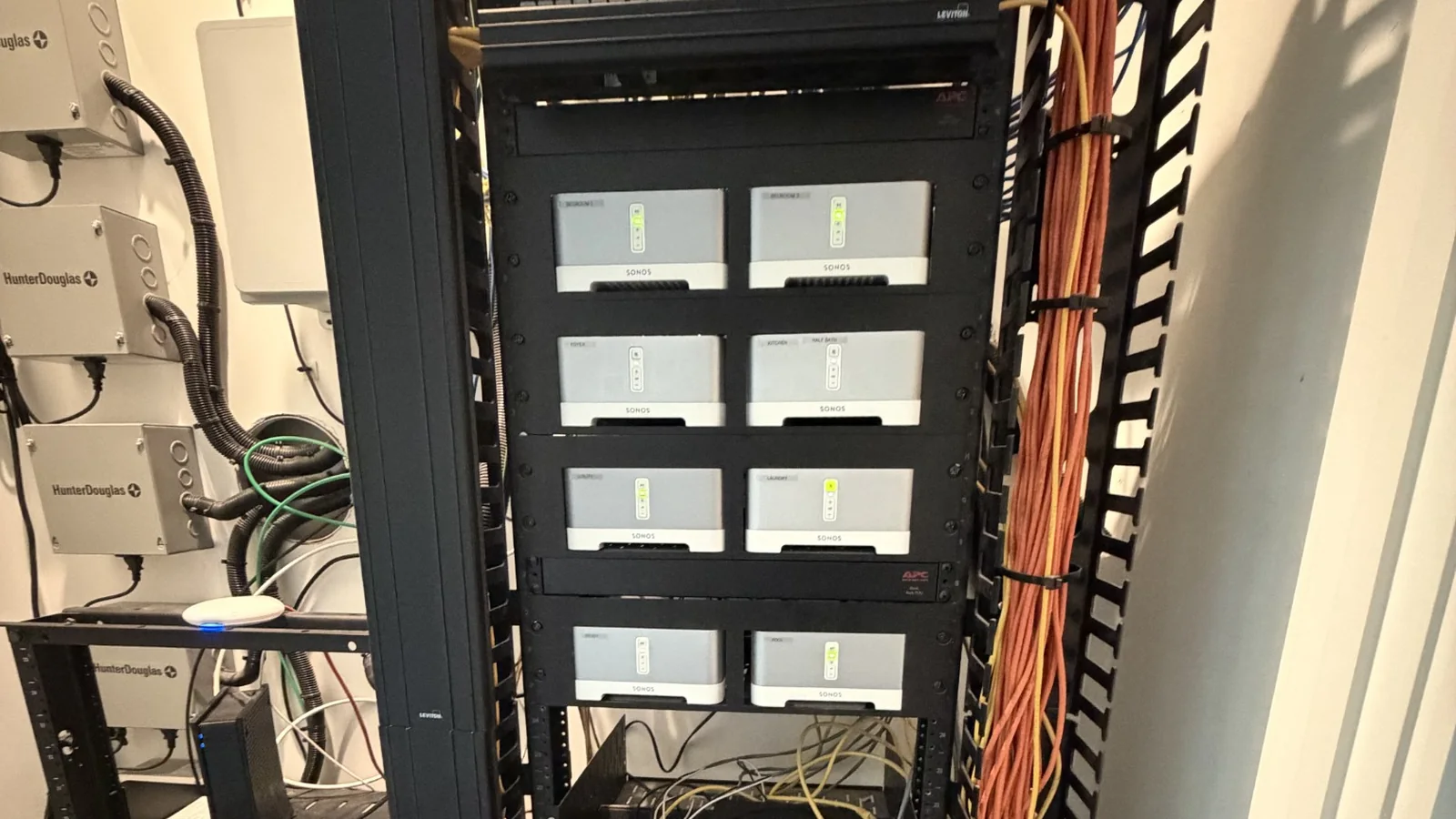
A stronger router is not always the answer. Large homes, block construction, multiple floors, outdoor spaces, camera systems, smart devices, and high-bandwidth entertainment can expose the limitations of consumer networking equipment quickly. Instead of simply adding another extender, Richter’s Reliable Services looks at the complete system.
A Better Network Starts With the Right Design
Instead of treating Wi-Fi as an isolated problem, we review the components that determine how traffic actually moves through your property:
The result is a system built around the property rather than a collection of temporary fixes.
Reliable Wi-Fi Throughout the Home
Modern homes depend on Wi-Fi for far more than phones and laptops. Streaming televisions, security cameras, doorbells, smart switches, thermostats, appliances, speakers, tablets, game consoles, and home offices all depend on the network working consistently.
Weak Wi-Fi Coverage
Improve areas with weak or inconsistent signals.
Buffering and Intermittent Connectivity
Identify whether problems originate with Wi-Fi, the network, connected equipment, or the internet connection itself.
Access Point Systems
Design and configure multiple access points so coverage is distributed properly throughout larger homes.
Managed Networks
Deploy managed switches, access points, VLANs, guest networks, and more advanced configurations when the property calls for them.
Smart-Home Networking
Build a stable foundation for Home Assistant, cameras, Sonos, Apple Home, smart appliances, lighting, and other connected systems.
Existing Ethernet Infrastructure
Identify, organize, test, and make better use of network wiring already installed throughout the home.
Networking That Works When Your Business Needs It
A small business does not necessarily need an enterprise IT department, but it does need a network that works.
Richter’s Reliable Services provides practical networking assistance for:
- Small offices
- Retail spaces
- Clubhouses and amenity centers
- Property-management locations
- Rental properties
- Workshops
- Churches and community spaces
- Small commercial environments
Systems can be planned around employee devices, guest Wi-Fi, printers, cameras, streaming equipment, audio systems, point-of-sale connectivity, and other network-connected equipment.
The focus is on reliability, maintainability, and sensible design, not selling complexity that the property does not need.
More Than a Consumer Router
Some properties benefit from dedicated networking components rather than a single all-in-one Wi-Fi router.
Wireless Access Points
Strategically placed access points can provide more consistent coverage than relying on one centrally located router or a chain of inexpensive extenders.
Managed Network Switches
Managed switching provides a more organized foundation for wired equipment, access points, cameras, entertainment systems, and other network-connected hardware.
Network Segmentation
More advanced systems can separate different types of network traffic when appropriate, such as:
- Primary household or business devices
- Guest devices
- Smart-home or IoT equipment
- Cameras
- Specialized equipment
Equipment Racks & Organization
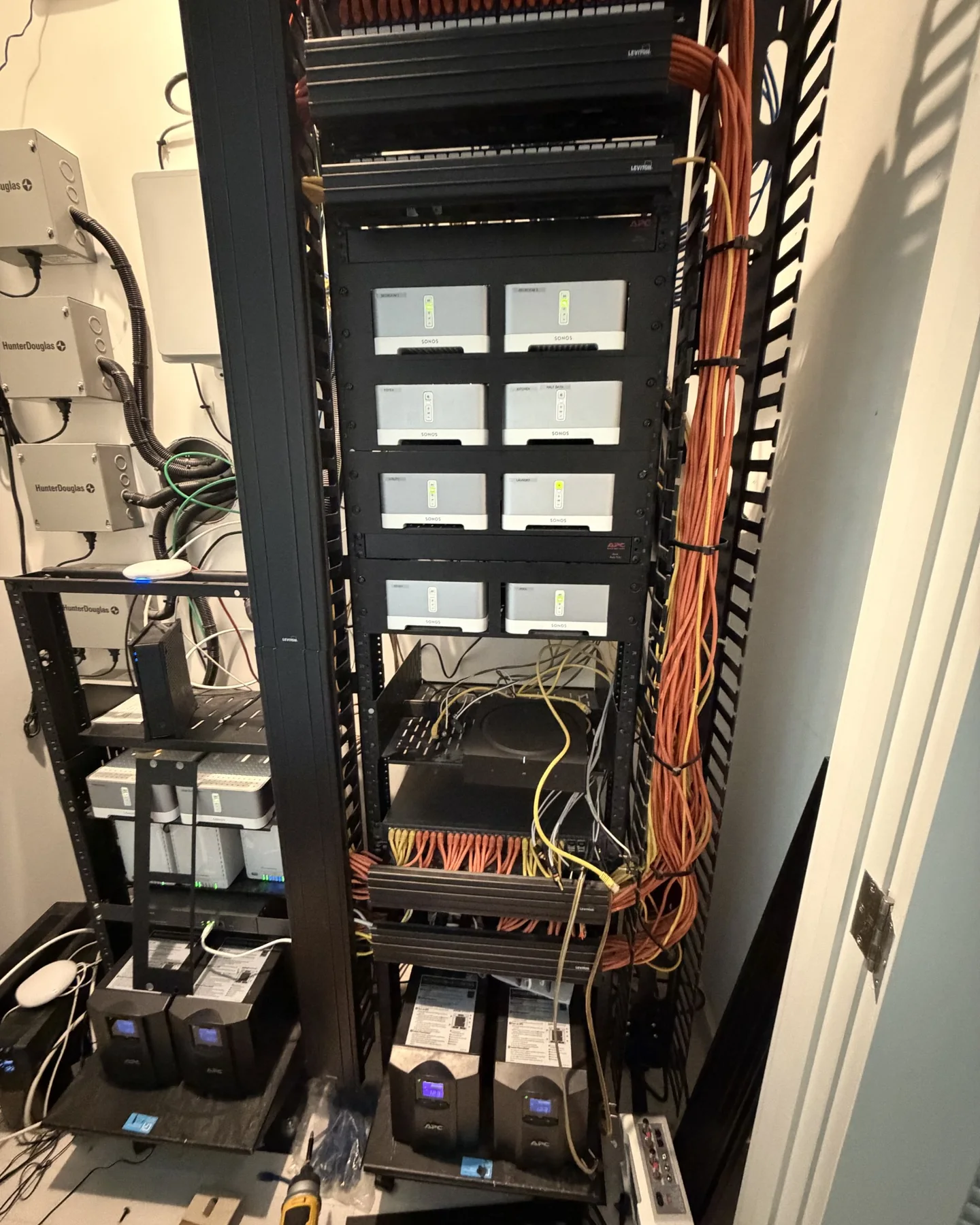
Existing technology closets can become difficult to service after years of additions and changes. Richter’s Reliable Services can help organize compatible equipment, improve labeling, clean up patching, replace outdated hardware, and make the system easier to understand and maintain.
Battery Backup
Compatible network equipment can be placed on UPS battery backup to help maintain connectivity during brief power interruptions and protect equipment from unstable power conditions.
You May Not Need to Start Over
Many homes already contain useful infrastructure. A network cabinet may have existing Ethernet wiring. A large equipment rack may already contain working switches, patch panels, audio equipment, or battery backup systems.
Rather than automatically replacing everything, we can determine:
- What still works?
- What is outdated?
- What is causing the current problem?
- What can be reused?
- What actually needs to change?
A thoughtful upgrade can often preserve useful infrastructure while modernizing the pieces that matter most.
Your Smart Home Depends on the Network
A sophisticated smart home running on an unreliable network will still be unreliable. Networking is especially important when a property includes:
- Home Assistant
- Apple Home
- SmartThings
- Connected lighting
- Smart locks
- Wi-Fi cameras
- PoE cameras using existing cabling
- Video doorbells
- Sonos
- Smart TVs
- Streaming devices
- Connected appliances
- Outdoor entertainment
- Voice assistants
Network planning can be coordinated with other technology work instead of treating each device as an isolated installation.
Planning more than Wi-Fi? Explore our Smart Home & Technology Services →
Real Equipment. Real Installations.
Technology does not always live in a neat box under the television.
Larger homes can have centralized network racks supporting access points, computers, televisions, cameras, smart-home systems, whole-home audio, battery backup, and dozens of wired connections.
Richter’s Reliable Services is comfortable working with both simple residential networks and more involved technology environments where networking, audio, smart-home equipment, and existing infrastructure all interact.
When the Speed Test Looks Fine but Everything Still Feels Slow
Internet problems are not always internet-speed problems. A speed test may show excellent results while a television buffers, cameras disconnect, or devices randomly lose connectivity.
Troubleshooting may include reviewing:
- Wi-Fi signal and coverage
- Access point performance
- Ethernet connectivity
- Switch configuration
- DHCP and addressing
- DNS behavior
- Device connectivity
- Network loops or topology issues
- Congested wireless channels
- Problematic smart-home devices
- Equipment stability
- ISP equipment and handoff
The objective is to identify the underlying cause instead of blindly replacing hardware.
Low-Voltage Cabling Notice: Projects involving new concealed low-voltage cabling are evaluated individually based on project scope, access, and applicable requirements. Existing wiring can often be reused, re-terminated, or reorganized.
Frequently Asked Questions
Can you improve Wi-Fi without replacing everything?
Often, yes. Existing equipment and wiring are evaluated first so useful infrastructure can be retained when practical.
Do you install mesh Wi-Fi systems?
Yes, when they are appropriate. A wired-access-point system may be preferable for some properties, while a mesh system may make more sense for others.
Can you work with existing Ethernet wiring?
Yes. Existing network wiring can often be identified, tested, organized, and incorporated into an upgraded system.
Do you install professional networking equipment?
Yes. Systems can include managed switches, dedicated access points, equipment racks, network segmentation, and other professional networking components when appropriate.
Can you help with cameras and smart-home devices too?
Yes. Networking can be coordinated with compatible cameras, smart-home devices, Home Assistant, Sonos, and other technology services.
Do you run new wiring?
Projects involving new concealed low-voltage cabling are evaluated individually based on the property, project scope, access, and applicable requirements. Existing wiring can often be reused or reorganized.
Do you work on business networks?
Yes. Small-business, clubhouse, rental, property-management, and similar networking projects are considered based on scope.
What areas do you serve?
Parrish is primary. Selected work in Ellenton, Palmetto, Lakewood Ranch, and nearby communities is considered case by case.
Ready for Wi-Fi That Just Works?
Tell us what is happening now, what equipment you already have, and what you want the property to be able to do. Whether the project is one unreliable room or a complete network modernization, Richter’s Reliable Services can help determine the practical next step.
Honest Work. Done Right.